SludgeRC
sludgerc is a modular bootloader that was designed for sludgeos, but can theoretically be used to boot any operating system that relies on commands being run in sequence, to create the full operating system (sludgerc => sludge run commands)
when sludgerc is started, it will read the file /etc/boot.cfg, which is written in a special syntax that allows for boot specific variables and "boot steps" to be defined
"boot steps" are snippets of lua code, that sludgerc will run in sequence, in the order as they are listed in boot.cfg... sludgerc comes with loadfile(), which has a second argument now:
loadfile(path: string, compile: boolean)
the second argument for loadfile determines if the loaded file is to be converted into a lua function, so if it is false or unspecified only the contents of the file will be returned
using loadfile() you can make these boot steps run files, to reduce clutter in the configuration file itself by separating long segments of boot code into many files
the syntax of boot.cfg is very very simple, being:
variable=value
"variable" will be set to "value" (value will always be a string!)
to make a boot step:
CODE=Name of this step;--lua code goes here
with the semicolon (;) being the seperator between name and codeblock
now, using this, you can start sludgerc and watch it go through any boot steps you have defined, returning either an "OK" or a "FAIL" if you have any FAILs, sludgerc will tell you what happened in an easily readable manner, where you can scroll both vertically and horizontally through error logs
if your bootsteps dont include any yielding, the computer will halt if every boot step has finished normally (with an OK)
sludgerc defines special variables in global namespace, that boot steps can access, such as:
SYS_BOOTERRORS is a table of FAILs containing more tables, in this format:
{ {title="something failed",mesg="information about this failure"}, ... }
SYS_BOOTCFG is a table containing all the variables defined in boot.cfg:
boot.cfg => MYVAR=true
SYS_BOOTCFG.MYVAR => "true"
preloadGPU is (if gpu is available) a proxy of the first gpu found...
now, you can read bootloader configuration in your boot scripts, but...
how do you supply log information to the user? you can do this with one
specific function, being boot_addInfo(), which is called with the syntax:
boot_addInfo(text: string)
an example output of this, used in a bootstep:
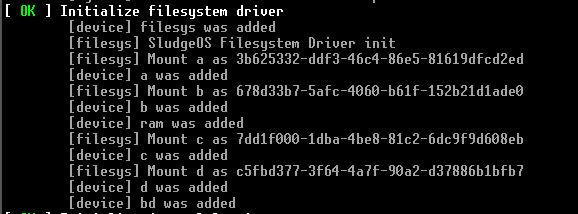
there are some specific variables you can define that will change the behaviour of sludgerc (in boot.cfg), being:
TITLE=string
which you can use to set the "name" of the operating system being booted, and:
OPENRC=true
which makes the text at the start of sludgerc look like openrc
VERBOSE=true
which makes the boot_addInfo function work in the first place, if it is disabled, no log output will be shown
More Info
This document was ripped (and modified) from sludgeos's repo
credit goes to hopa